Showing posts with label free resources for students. Show all posts
Thursday, December 27, 2012
Gooru - the Search Engine for Learning
Gooru is a site I wrote about a while back when it was in Alpha status. It is now in Beta status and open for everyone to use.
Gooru describes itself as a "Search Engine for Learning". It is a study tool that allows students to explore resources and study guides that are aligned to standards. The materials are in math, social studeis and science and are from 5th grade up to high school. Resources include digital textbooks, videos, animations, links and much more. It also includes social media functions so that students can work, study, and share with others.There are ready made collections of resources, and users can create their own collections of resources as a study tool, or even as a class project.
There are self-assessments in Gooru that help it adapt to the student, suggesting resources and study guides based on the student's performance.
The resources are all vetted by educational professionals and you can even create custom collections and resources.
The site has resources to learn more about it and how it can be beneficial to educators and students.
Tuesday, October 2, 2012
Bartleby - free books, lit and reference information
Bartleby is a site that contains a huge amount of literature and reference books online, for free. The materials, both books and reference information, are categorized by reference, verse, fiction, and nonfiction. There is also a dictionary, thesaurus, encyclopedia and quotation dictionary.
The site is easy to use and easy to search and is a great reference for any educator and student.
Tuesday, September 25, 2012
Google Code-In 2012 - contest for High School Students
Google has announced Google Code-In 2012, a contest for high school students. It is in it's third year and will begin on November 26th. The contest is for 13-17 year old students and is all about software development. It runs from November 26th to mid January and there will be 20 grand prize winners. The grand prize winners, along with a parent/guardian, will get a trip to Google Headquarters in Mountain View California.
The contest has tasks that are related to current open-source projects. These projects have worked with students before in the Google Summer of Code college student program.
Students will have to write or re-write code, create documents, do research and outreach tasks, QA and more.
This is a great opportunity for high school students interested in coding and computer science.
Related:
Google for Education Resources
Free Computer Science Resources
Learning HTML Code - some resources to get started
Google Code University - free computer science classes
Wednesday, September 19, 2012
citelighter - Store, organize, and share your education and research for free
Citelighter is a free tool that helps you to do research online and capture your research notes easier. Using a toolbar in your browser, you can easily clip the important information and notes and then save it all to your account. You can organize it and even format a bibliography. It is being touted as "Evernote for Education". While it can clip and organize your research like Evernote, it adds the bibliography function.
You can highlight and save your notes, instead of cutting and pasting, and then simply organize your ntoes in the drop down window from the toolbar. You can even add your own notes and comments right with your research.
This is a great tool for anyone doing research online. Check it out. http://www.citelighter.com/
Thursday, September 6, 2012
Free Online Science Journal from US Forest Service
The US Forest Service has a very cool site called the Investi-gator, that is an upper elementary school science education journal. There are articles on leaves and why they change colors, ozone, soil activity, and much more, with discussion questions, interviews with scientists, lesson plans and assessments to use with students. You can download the journal issues, view them online, or order free copies for your classroom.
This is another great educational resource for teachers. http://www.scienceinvestigator.org/
Monday, August 20, 2012
Lifehacker App Packs for Students
Lifehacker is a great site with tips, information, and resources on pretty much everything, from cooking to travel to technology to education. They have a great resource called the Lifehacker Packs for Students. These are lists, with links, to great apps for students. They are sorted by operating system and then by category. There are some great apps here and it's a great place to find great apps for students all in one place. This is also an excellent resource for anyone looking for some great apps.
Check them out here: http://lifehacker.com/5933059/the-lifehacker-pack-for-students
Related:
Essential Apps and Installs for Windows, Chrome, Android
Mobile Apps and Resources for Students and Teachers
Monday, July 2, 2012
Gooru - collections of free study guides and resources
Gooru is a site I wrote about this past February that was in private Alpha. I just received notice from them that they have now launched their Beta site and it's open for use.
Gooru is a search engine for education and learning. It contains study guides, aligned to standards and personalized, on topics in 5th - 12th grade math and science. Resources include videos, animations, links, digital textbooks, and more. All of the resources have been organized and reviewed by teachers or content experts.
Here's a small sample of what a search for "physics" returns:
It also contains a social aspect with a community to discuss topics and ask questions. There are also self-assessments that Gooru suggest resources and study guides to help you.
Check it out and share with your students: http://www.goorulearning.org/gooru/index.g#/home
Tuesday, June 12, 2012
Assignment Planner - free Android app for Students
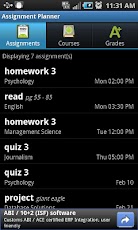
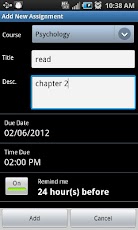
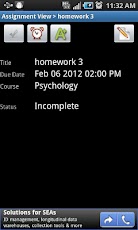
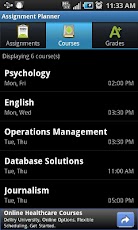
I just learned about Assignment Planner from Edudemic. Assignment Planner is a free app for Android that keeps track of assignments, homework, projects, course and class information, and grades. It includes the ability to sort assignments by due date or course and set reminders for assignments. It's easy to use and got excellent reviews. (Here are some more apps for students for notes and class planning)
The free version has ads (at bottom of the screen - never bother me on my ad supported apps) but the pro version with no ads is only $1.29.
This is a great resource for students to stay organized in school and not forget about things.
Check it out in the Google Play app store and on Facebook.
Related:
10 Great, Free Apps for Students for Notetaking and Class Planning
Comparison of some popular note taking apps
Getting Students and Teachers Organized - tips and resources - includes links and resources for electronic and paper planning
10 Things Students Use Technology for in my Class
Wednesday, May 2, 2012
Zendo is now StudyEgg - quiz and help students using open source videos
Last March I wrote about Zen.do, which is a free site that allows students to take notes as normal, while it automatically builds a study guide of related flashcards. Students can then review the flash cards as a study tool. There is a built in algorithm to optimize the review time of the students as they use the flash cards.
I just received an email from on the the partners for Zen.do announcing that they have evolved and rebranded Zen.do into StudyEgg. It's a free service that integrates videos, help, quizzing and learning techniques.

What is StudyEgg?
StudyEgg quizzes students on great open source videos from Khan Academy, MIT OpenCourseWare, OpenUniversity, Yale, TEDed and more by pacing them through the videos with rich questions and helpful explanations. Students can feel confident that they are learning the material presented in the videos through instant feedback from the questions they are asked. The StudyEgg library currently features over 100 different science videos, with more being added each week!
StudyEgg is a good tool for students to use as review or extra help about a topic and get both instant assessment of how they are doing, as well as explanations of the topic.
StudyEgg starts out with a question on the topic you select, and then if you get it wrong, will show you a video explaining the topic and why the correct answer is correct. Questions can be timed and there is an "I don't know" button that will take you to the video that will explain the topic for you. You get feedback on your progress as you go along.
There are 5 main subject areas (Biology, Chemistry, TED Ed, Psychology and Critical Social Psychology) right now, with many more coming. They did just launch after all.
StudyEgg is also integrated into Edmodo, giving teachers an insightful dashboard that allows them to know how their students are doing on StudyEgg lessons individually and as a whole class. This is a great way to track which students are doing the work and who may be looking for help.
Check it out and share: http://www.studyegg.com/ The developers (students, teachers, scientists, engineers, and hackers who love learning) would also love to get feedback from teachers and students about StudyEgg and how they can improve it.
Now, I'm not a huge fan of the Flipped Classroom Model (assumes students have tech at home and puts lots more homework on them) and while I see uses to Khan Academy, it's not the savior of education (although many see it at that) and can't be the only way students learn. These types of models and resources can be part of a teacher's (and student's) tools to help differentiate learning and help students succeed. They should not be over used. They are great resources for helping students and for students to use as self-review and self-help. I think StudyEgg has created something that combines a lot of great resources into a tool that students and educators can use as part of the learning process.
Related:
zen.do - free tool to take notes and turn them into flashcards
Wednesday, April 25, 2012
CIA World Factbook - excellent resource about countries of the world
The CIA (Central Intelligence Agency) World Factbook is an incredible resource about the countries of the world. It's free and available online and you can also download a copy for offline viewing and access. Older versions (back to 2000) are also available, which can be good for history teachers looking for older information.
The site has information on the history, people, government, economy, geography, communications, transportation, military, and transnational issues for 267 world entities. The Reference tab includes: maps of the major world regions, as well as Flags of the World, a Physical Map of the World, a Political Map of the World, and a Standard Time Zones of the World map.. It's a great resource to find out information about the countries of the world and the CIA is constantly updating it.
Check it out and share it with your students. https://www.cia.gov/library/publications/the-world-factbook/
Friday, April 13, 2012
My GCSE Science - science resources for teachers and students
The videos are good and there are notes pages that go with them. The notes pages have images from the video along with space to write your own notes. The video listing has the length of the video also.
They are organized by subject and topic and the videos are hosted on YouTube.
This is good for students to use for review, missed work, and help, and for teachers to use in class or for absent students.
Here's some of the Chemistry and Physics videos. Click on the video or "Learn" to get to the video. "Notes" brings you to the PDF notes for the video.
Notes page example:
Thursday, April 12, 2012
instaGrok - awesome education search, curation, and journal site
instaGrok is a interesting site I just learned about. instaGrok's tagline is "A New Way to Learn" and they define "grok (v): to understand thoroughly and intuitively".
instaGrok is a type of search engine that finds educational content and retrieves it in multiple formats, including web pages, images, videos and even forums. It filters out non-educational content and profanity, uses crowd sourcing to rate the quality of each search result, displays search results according to grade level difficulty, provides source notes, visualizes concepts in an interactive concept map, updates the concept map as you refine your topic. It also allows curation and tracking of your websites, concepts, student activities, and can generate multiple-choice questions from the search results. Students can use it to create editable research journals ("groks") and the groks will be populated with websites visited and the concepts covered. Teachers can review the students' groks and add comments.
Here's an instaGrok search for "Heat Capacity". The search results are shown in the concept map, and as you click on each circle, it opens up more results. The right side menu has key facts, websites, videos, images, quizzes, and concepts. In less than 5 seconds, I have an incredible amount of information and resources on heat capacity that I can use with my students. Students can quickly do searches and find relevant information and resources on any topic.
Here's a summary of features and results:
It's a very cool way to do research and curate and share the results.
instaGrok: http://www.instagrok.com/
Tuesday, April 10, 2012
Evernote - tips for students to be more productive with it
I just posted a new resource to the Evernote for Education page, entitled "10 ways Evernote can help make students more productive" which great tips for students to use Evernote in Education.
Evernote is one of my favorite resources for both educators and students. It really is an amazing app and service.
If you haven't tried Evernote yet, or want to learn more about it, check out the information and resources here: Evernote for Education page
Thursday, April 5, 2012
SparkNotes app available for Android -teach students responsible use
I remember in high school when ever we had a book report due, we'd head off to the library or bookstore for Cliff Notes. Now students have SparkNotes website and now an Android App. SparkNotes provides guides and chapter summaries of books. The app is free and their is an iOS version.
While some students misuse this and use this instead of reading the actual book, teachers could show these kinds of resources to their students and how to use them to help them understand what they are reading. Show the students that these are help resources, not something to replace the actual reading of the book.
The app has 50 study guides pre-loaded, you can download more and it has a built-in social networking feature to connect with other users.
This is one more resource that students have available to them. One way or another they are going to use it. As educators, we need to show them how to use the resource properly.
Get the SparkNotes app: https://play.google.com/store/apps/details?id=air.com.sparknotes.sparknotes
Related:
Android for Education resources and apps - app reviews, apps for education, news, tips, resources, and more.
Wednesday, March 28, 2012
Google Summer of Code Student Internships applications open
Google is once again hosting a summer internship for students called "Summer of Code." It is a paid internship for students who will work on open source projects. Organizations submit proposals for projects, students apply to work on those projects and then Google gets them connected to code over the summer. Student applications are now open with a deadline of April 6th. There are 180 projects for students to chose from.
More information is available here:
Subscribe to:
Posts (Atom)