Friday, May 25, 2012

Eddie Eagle GunSafe Program - should be taught to all students


The Eddie Eagle GunSafe Program is a program from the NRA (National Rifle Association) that teaches children in Pre-K through 3rd grade four important steps to take if they find a gun. It's a simple, easy to remember format:

If you see a gun: STOP! Don't Touch. Leave the Area. Tell an Adult. 

Eddie Eagle

It was recently in the news when a young child who had been taught the program found a gun and followed the program.

I am a member of the NRA and I own a firearm. I have been shooting since I was a Boy Scout. I believe in the 2nd Amendment. I also believe in enforcing gun laws and firearm safety. I don't have any children, but my pistol is safely secured at home and I follow all safety rules.

Unfortunately, not everyone in this world follows gun safety rules and there are many illegal guns in our world. As educators, we should be teaching our students more than our curriculum and content and teach them important life skills and safety information.

Anyone can teach the Eddie Eagle GunSafe Program and is easily integrated into school curriculum. There are materials available, including workbooks, videos, instructor guides and more. There is a nominal fee for the program, but schools can apply for grant funding for it. It was developed in cooperation with firearms experts and educators.


The purpose of the Eddie Eagle Program isn't to teach whether guns are good or bad, but rather to promote the protection and safety of children. The program makes no value judgments about firearms, and no firearms are ever used in the program. Like swimming pools, electrical outlets, matchbooks and household poison, they're treated simply as a fact of everyday life. With firearms found in about half of all American households, it's a stance that makes sense.Eddie Eagle is never shown touching a firearm, and he does not promote firearm ownership or use. The program prohibits the use of Eddie Eagle mascots anywhere that guns are present. The Eddie Eagle Program has no agenda other than accident prevention -- ensuring that children stay safe should they encounter a gun. The program never mentions the NRA. Nor does it encourage children to buy guns or to become NRA members. The NRA does not receive any appropriations from Congress, nor is it a trade organization. It is not affiliated with any firearm or ammunition manufacturers or with any businesses that deal in guns and ammunition.


eduClipper - clip anything, share everything


eduClipper is a new app coming from EduTecher Adam Bellow. eduClipper is in sign up mode now and promises to provide a way to clip anything from the web and then share it with anyone.

Knowing Adam, this will be a great resource for educators and students.

Sign up to be notified when it's ready to go.


Related:

EduTecher - explore and share educational web tools

Thursday, May 24, 2012

Rockets Project a Success! Fun day launching today


I love rockets. My Bachelor's degree is in Aerospace Engineering and I've been interested in rockets since I was a kid. My dad worked on the main engines for the Saturn V rocket when he worked at Pratt & Whitney as a chemist, I've designed and manufactured parts for the space program as an engineer, and my senior project in college was designing a two-state-to-orbit space vehicle (and we got to work with NASA engineers on the project - very cool!). I've found that all kids seem to have some interest in rockets and I use that as a great end-of-the-year project in my physics class.

Today was Rocket Launch Day for my Physics classes. It's the finale to their last project of the year. We launch their rockets multiple times, even having a little fun and doing modifications to the fins and rocket to see what happens. It was slightly overcast with 5-10 mph wind out of the SouthEast, but we only lost two rockets into the trees near the field. We use A8-3 and B6-4 engines, with average impulses of 2.5 N-s and 5 N-s and maximum thrust of 10 N and 12 N, respectively. Average altitudes for these rockets are between 150 and 300 feet.

Here are some pictures some students took from today's launches.

A couple of the students jump when the 1st rocket launches


That's me at the launch controls. 


Their end of the year project is to research, design, build, analyze, and launch model rockets. The project combines physics concepts from throughout the year (stress, stability, aerodynamics, Newton's Laws and Forces, energy, impulse, matter and chemical energy, fluids and more) as well as helping students to continue to build their teamwork, communications, and problem solving skills. They have to use physics concepts to predict the altitude the rocket will go (based on mass, aerodynamics, forces and impulse). We then use trackers to measure the angle for the rockets, and knowing the distance the trackers are from the launch pad they can use trigonometry to find the actual altitude. They then have to complete a project report with all of their design information, calculations, analysis, and why their predicted and actual altitudes were different (usually are) along with any issues they had.

It's a great project to end the year. They learn and have fun all at the same time.

Cover of the Rockets Educator Guide+

I found a great resource from NASA - The Rockets Educator Guide - that includes lesson plans and activity ideas. NASA's site is a great resource for this type of project. This guide has some great activities like rockets using film canisters, baking soda, and vinegar, paper rockets, altitude trackers and more. There is even a part on the history of rockets.

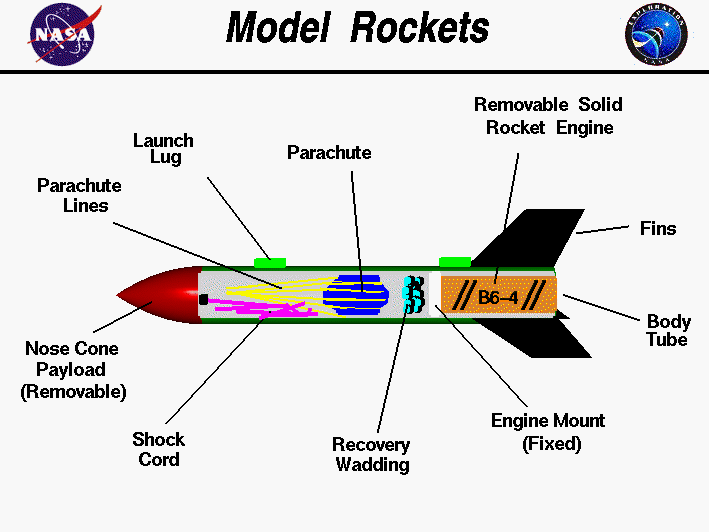
The students start the whole unit with a WebQuest on NASA's site about rockets - NASA's Beginners Guide to Rockets: http://www.grc.nasa.gov/WWW/K-12/rocket/index.html This site helps them tie all the physics concepts together and apply them to rockets. It also explains how model rockets work, from the engine propellant and nozzle, to the recovery system and ignition system.


Computer drawing of a model rocket with the parts tagged.

You can extend the unit and do more activities from the educators guide. You can also have students research space missions, current spacecraft, and the future of space travel.

Discovery Education Streaming has some great videos and resources, including the "NASA at 50", "Bill Nye Great Inventions" and "When We Left The Earth: The NASA Mission" series.

The students learn a lot, see an application of what they have learned, work as a team, and have some fun. It's a great way to end the year.

Topics in this unit:
history of rockets
transportation
energy transformations
fluid dynamics
thermodynamics
aerodynamics
chemistry of solid fuel engines
stability
Newton's Laws
Gravity
air resistance

Skills:
Teamwork
communication
reading comprehension
manual dexterity
application of knowledge
problem solving
math

Resources needed:
computer with internet to connect to NASA website
NASA Rockets Educator Guide - free
Model rocket kits, engines, and launcher (available from a variety of companies and suppliers. I use Estes).
(funding for these supplies have been through Donor's Choose and an Air Force Association classroom grant).

Rockets resources:
NASA's Beginners Guide to Rockets: http://www.grc.nasa.gov/WWW/K-12/rocket/index.html
Estes Model Rockets - Educator Page: http://www.esteseducator.com/
Apogee Rockets - http://www.apogeerockets.com/ (click on "Educational")
National Association of Rocketry: http://www.nar.org/teacher.html

NASA Speakers Bureau - free guest speakers for your class


As a science teacher, NASA is an incredible resource for me. NASA has tons of great, free, educational resources that are also good for any subject.


NASA also has a speakers bureau that will provide engineers, scientists, and other professionals to speak to audiences around the country. You can also request an astronaut to come and speak to your class. It is free, but there are some conditions. It is an easy process.

Have some exciting, knowledgeable speakers come to your school, for free, and educate and motivate your students.


NASA Speakers Bureau

NASA - Find lots of great educational resources


DNS Charger Issue - Google notifying users through search


Public Service Announcement:

DNSCharger is malware botnet shut down in 2011 by the FBI and computer groups through some re-routing of internet servers. Most people are fine, but many computers - personal, corporate, and government - are still at risk. The FBI is shutting down the fix in July and many people will lose internet access if they don't apply the fix by then. Google is helping by notifying users that they have the infection when they use Google's search page. This should help people make the fix before the shut down.

You can also go here: http://www.dcwg.org/ to see if your computer is infected and make the fix.

Please share this with your friends, colleagues, and students.


Wednesday, May 23, 2012

Update on InstallFree Nexus and Rndr - work great on a Chromebook!


Nexus Logo

Earlier today I wrote about InstallFree Nexus and Rndr, apps that allow you to use other apps, like LibreOffice and Java, on any device. Here's the full article: http://educationaltechnologyguy.blogspot.com/2012/05/installfree-nexus-us-ms-office-or.html


I've been using them all day on my CR-48 Chromebook and they work great! The biggest thing that I was not able to do on my Chromebook was accessing our Gradebook system, which runs on Java. Using Rndr, I was able to access it and use it on the Chromebook. It's not as speedy as on a Windows device, but not bad at all, and the company making Rndr tells me that there are some performance improvements coming shortly.

You can also use their apps to use LibreOffice (or MS Office) in the cloud on any device, including iOS, Android and Chrome. I was using the LibreOffice version and I was able to open up, view and edit LibreOffice and MS Office files directly from my Google Drive without needing to convert them to Google Docs formats.

All-in-all, these apps are a great resource for anyone, especially those using Chromebooks.

Check out my full review here: http://educationaltechnologyguy.blogspot.com/2012/05/installfree-nexus-us-ms-office-or.html


Related:

Google Chromebooks and Chrome OS revisited - great for education
iPads, Chromebooks, on-device apps, cloud apps - great discussions


Google Chromebooks and Chrome OS revisited - great for education


I am a huge user of Google's many apps and resources. I also was lucky enough to receive a CR-48 Chromebook from Google to use and review. I really love how it works and think Chromebooks are an excellent idea for education. There is no support needed, nothing to install, it updates on it's own and you can do everything on it. All you need is an internet connection. Considering most people do everything online with web apps anyway, that's not a big deal. You can also have different user accounts and no data is stored on the device, making it great for sharing among students. The battery lasts a long time too. With all of the free web apps that exist, there is no need to license software either.

One issue that I did have was that I couldn't run Java apps so I couldn't run our gradebook software (from PowerTeacher). I just reviewed a new, free, app for Chrome called Rndr, that allows you to use Java apps on any device. I was able to use the gradebook on my Chromebook and now there is nothing I can't do with it.


They are becoming more popular and widespread and a great option for schools.


Here is a great video on what Chrome OS is:


Related:


Google Chromebooks for Education - updated pricing and info